Windows Authentication Doesn't Work - HTTP Error 401
Overview
This article addresses the issue of receiving HTTP error 401 when attempting to use Windows authentication in the Admin and Helpdesk portal. It provides steps to ensure that the configuration is set up correctly.
Symptom
You configured the Admin and Helpdesk portal per the KB1162 to use Windows authentication; however, you keep getting HTTP error 401. Switching to Basic authentication works fine, but you prefer not to use it.
Cause
Windows authentication in IIS depends on the providers it uses. If the providers are configured incorrectly, Windows authentication will not work.
Resolution
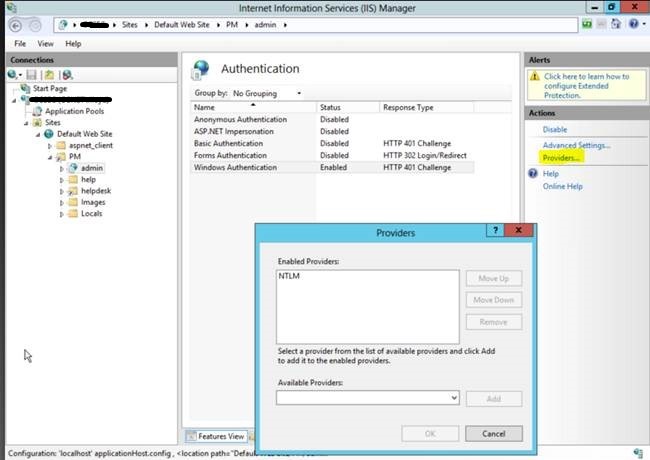
Make sure the providers for Windows authentication are configured correctly. Follow these steps:
- Launch IIS Manager.
- Navigate to the admin virtual directory (by default, it is
%Server name% - Sites - Default Web Site - PM - admin). - Go to Authentication configuration.
- Select (highlight) Windows Authentication.
- In the right pane, click Providers.
- Ensure NTLM is present. Add it if needed.
- Click OK to apply changes.